Support

NarraSense Support

NarraSense is a platform for synchronized immersive and multisensory experiences.

The NarraSense system combines an operator-controlled NarraSense Studio running on a Windows computer with one or more NarraSense Players running on Meta Quest headsets.

Studio coordinates sessions over the local network, while immersive media is stored and played locally on each headset for reliable synchronized playback.

NarraSense can also coordinate supported external devices such as scent hardware alongside the immersive experience.

How NarraSense works

NarraSense Studio
Local Network
NarraSense Player(s)

Optional multisensory hardware is controlled separately by NarraSense Studio.

A public Internet connection is not required for normal operation. The Studio computer and Quest headsets only need to be able to communicate over the same local network.
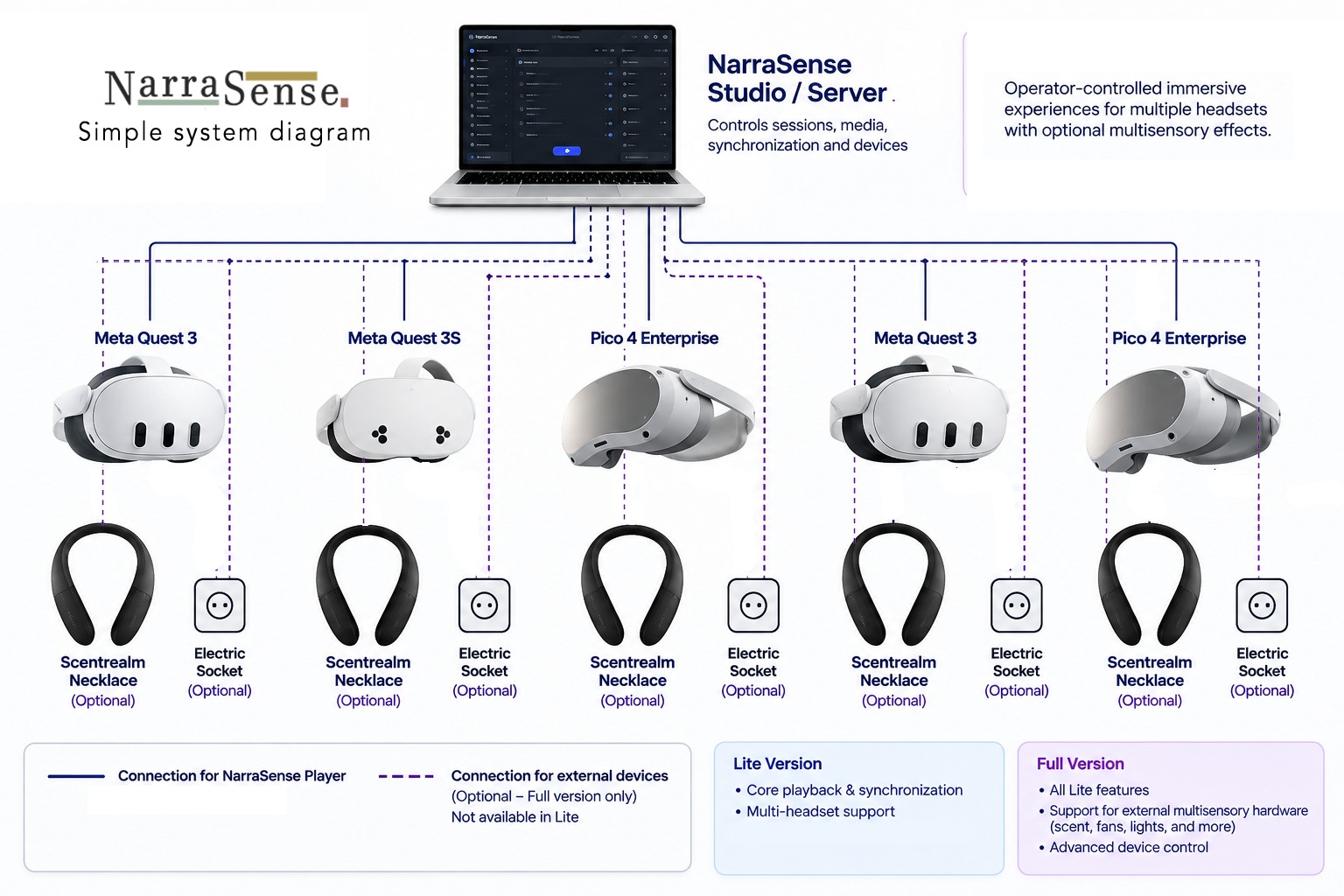
NarraSense system diagram: NarraSense Studio connects over the local network to one or more NarraSense Players, with optional multisensory hardware controlled separately by Studio.

Getting started

1

Connect the system to the local network

Connect the NarraSense computer and Quest headset(s) to the same local network.

2

Start NarraSense Studio

Launch NarraSense Studio on the Windows computer and wait until the interface is ready.

3

Configure the network if required

If you are using a router that is not connected to the internet, configure it in the Network Setup page.

4

Start NarraSense Player

Launch NarraSense Player on the Quest headset. No controller or hand interaction is required.

5

Wait for the Player to connect

NarraSense Player automatically searches for NarraSense Studio on the local network. A connection indication appears in the app.

6

Configure the headset

In Headset Setup, give the connected headset a name and assign its language.

7

Start the experience from the Studio Dashboard

Once the headset appears as connected, select the required experience and control playback from NarraSense Studio.

Player connection states

Connected to server

The Player is connected to NarraSense Studio and ready to receive session and playback commands.

Connection lost — reconnecting

A previously established connection was interrupted. NarraSense Player automatically attempts to reconnect.

No server found

The Player has not located NarraSense Studio on the current local network.

Connection troubleshooting

If a headset does not connect:

About NarraSense Player

NarraSense Player is intentionally designed as a managed immersive-media endpoint rather than a standalone consumer media player.

Playback, session selection and multi-headset control are handled by NarraSense Studio. Media itself is played locally on each headset.

The system is designed primarily for professionally operated experiences including museums, exhibitions, educational installations, demonstrations and location-based immersive experiences.

Need help?

If you contact NarraSense Support, please include where possible: